Know what each dish costs you, and what's left on the shelf
Recipes deduct ingredients as the kitchen accepts orders. See stock levels, low-stock alerts, food cost per dish and margins.
Free trial, no card needed.
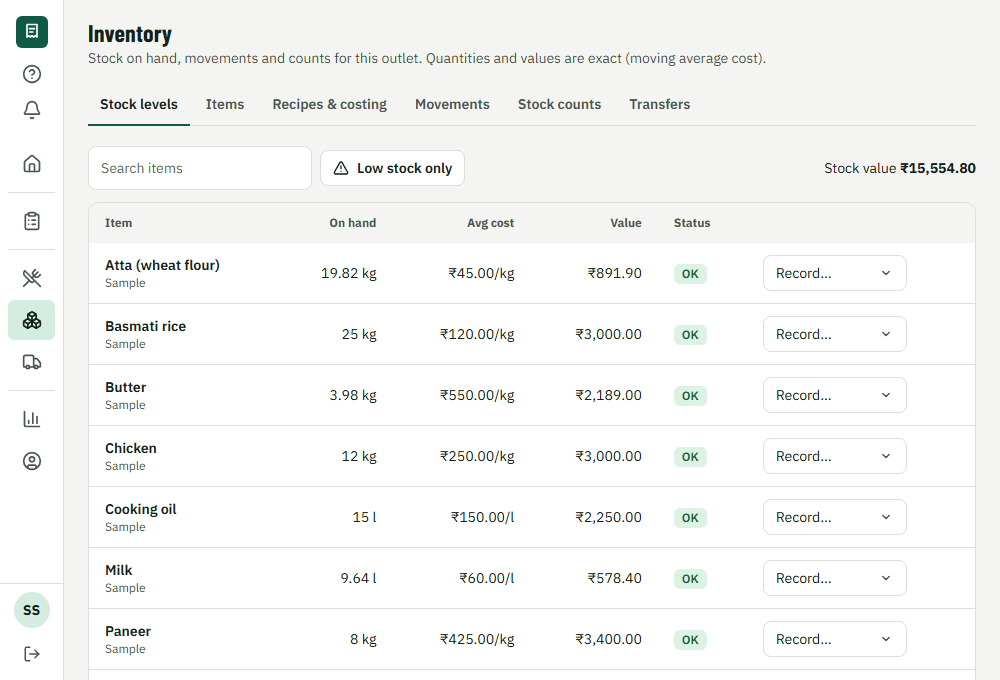
How it works during service
1. Set up
Add ingredients with their units and a recipe for each dish.
2. Buy
Raise a purchase order, receive the goods and match the supplier's invoice.
3. Cook
Ingredients are deducted as the kitchen accepts each order; wastage is recorded too.
4. Count
Count the shelf and see the variance against what the system expected.
What's included
Recipes and costing
Cost per serving from your actual purchase prices, and margin per dish.
Purchasing
Requests, approved purchase orders, goods received, supplier invoices and returns.
Counts and variance
Stock counts show the gap between what the system expected and what is on the shelf.
Several outlets
Transfer stock between outlets and compare food cost side by side.
What it changes for your restaurant
- Reorder before a dish runs out mid-service
- See which dishes make money, from real purchase prices
- Spot unexplained stock loss from the count variance
Common questions
Do I have to use inventory?
No. It's optional; ordering and billing work without it.
Which plan includes it?
Inventory, recipes and purchasing are in the Growth plan and above. The free trial includes everything.
Works together with
- Reports and analyticsSales, items, tax and staff
- POS and billingTake orders and payments
- Kitchen displayTickets on a screen, with sound
Run your next service on VercentDine
14-day free trial, no card needed. Start with the sample menu and place a test order right away.