A point of sale your cashier learns in one shift
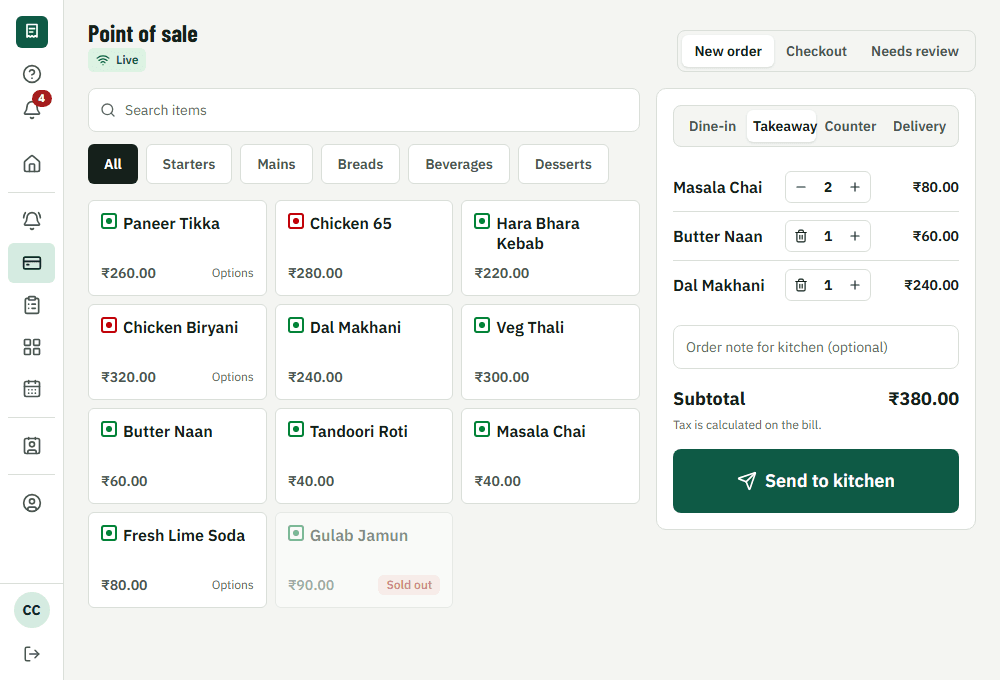
Dine-in, takeaway, counter and delivery orders, split and merged bills, discounts with manager approval, and cash, UPI or card on one screen.
Free trial, no card needed.
How it works during service
1. Ring up
Tap dishes on the menu grid, search, or scan a barcode. Choose dine-in, takeaway, counter or delivery.
2. Bill
A table's bill is built from everything it ordered. Split it, merge tables or add a discount.
3. Pay
Take cash with change, UPI with a reference, or a card or UPI payment through Razorpay.
4. Close
At the end of the shift, count the drawer and see the difference against what was expected.
What's included
GST-ready bills
Tax per line, CGST and SGST on the receipt, HSN/SAC codes and your GSTIN. Receipt numbers never skip.
Split, merge, move
Split a bill by guest or by item, merge tables, move a party. Every change is recorded.
Cash you can trust
Open and close a cash shift, record pay-ins and pay-outs, and see the difference at close.
Keeps going offline
If the internet drops, the POS keeps taking cash orders and sends them when the connection returns.
What it changes for your restaurant
- Faster table turns: the bill is ready when the guest asks
- Discounts, voids and refunds need approval and leave a record
- Cash differences show up the same day, not at month end
Common questions
Can I use my own payment account?
Yes. Online payments go to your own Razorpay account. VercentDine never holds your money.
Do I need a special printer?
No. Any network ESC/POS receipt printer works, or send the bill digitally.
Does it work with a barcode scanner?
Yes. A USB or Bluetooth scanner that types like a keyboard adds the matching item to the order.
Works together with
- Kitchen displayTickets on a screen, with sound
- Reports and analyticsSales, items, tax and staff
- Loyalty and offersCustomers, offers, points
Run your next service on VercentDine
14-day free trial, no card needed. Start with the sample menu and place a test order right away.